The application that refuses to die
The following scenario is a composite, written for illustration. It does not describe any specific organisation.
The order-management system went live in 2013. It is an ASP.NET MVC 5 application on .NET Framework, hosted on IIS across two Windows Server virtual machines, backed by a SQL Server database that has quietly grown to several hundred tables. It processes every customer order the company takes. In a typical year it fails rarely enough that nobody outside the operations team can remember the last outage.
By the measures most organisations actually track — uptime, ticket volume, user complaints — it is a success.

Look closer, though, and the picture changes. Deployments happen on a Thursday evening because one engineer knows the sequence of manual steps and the order in which the application pools must be recycled. The build runs on a dedicated server that nobody wants to touch, because the project still uses packages.config, a pre-SDK-style project file and a post-build script that copies assemblies into place. Two NuGet dependencies have not been updated in years because their newer versions dropped .NET Framework support. The PDF reporting component is a commercial library whose vendor stopped issuing updates. A single-sign-on integration works, but only through a custom HTTP module that reads a header injected by a load balancer that is itself due for replacement.
None of this shows up as an incident. All of it shows up as friction: changes that take three weeks instead of three days, a new hire who needs two months before touching the checkout flow, a security questionnaire from a large customer that takes days to answer honestly.
This is the central confusion in most conversations about legacy ASP.NET modernisation. Operational stability measures whether a system works today. Architectural sustainability measures whether it can keep working, keep changing and keep being secured at an acceptable cost. The two can diverge for years before anyone notices — and the gap tends to widen precisely because the system is stable enough that nobody is given a reason to look.
This article examines that gap: what "legacy ASP.NET" actually means in late 2026, which costs conventional budgets miss, why the instinct to rewrite is so often wrong, and how to decide between keeping, incrementally modernising or replacing a mature application.
Part I — What "legacy ASP.NET" actually means
"Legacy ASP.NET" is used loosely to describe anything built before ASP.NET Core. That looseness causes real planning errors, because the technologies underneath have different support terms, different migration paths and very different migration difficulty.
Five things that are often treated as one
.NET Framework is the Windows-only runtime and class library that all classic ASP.NET runs on. Its final version is 4.8.1. Microsoft states that 4.8.1 will continue to ship with future Windows releases and remains supported for as long as it is installed on a supported version of Windows. In other words, it follows the component lifecycle of the operating system rather than a fixed end date. That is why the common claim that ".NET Framework is unsupported" is wrong — but so is the assumption that every Framework application is covered. Versions 4.5.2, 4.6 and 4.6.1 lost support in April 2022, and 4.6.2 reaches end of support on 12 January 2027.
ASP.NET Web Forms is part of .NET Framework itself and inherits its support policy. It was never ported to ASP.NET Core and never will be. Its event-driven page model, ViewState, server controls and postback lifecycle have no direct equivalent in modern .NET. Microsoft's own guidance positions Blazor as the closest conceptual successor, while candidly noting that a working Web Forms application often has no need to migrate at all.
ASP.NET MVC 5 and ASP.NET Web API 2 ship separately from the Framework, as NuGet packages. Microsoft supports them under its "Tools" lifecycle, which guarantees at least 12 months' notice before support ends. No end date has been announced for MVC 5.x or Web API 2.x as of November 2026. Their controller-and-action model maps reasonably well onto ASP.NET Core, which is why they are usually the easiest classic ASP.NET applications to move.
ASP.NET Core is the rewritten, cross-platform web framework. It originally ran on both .NET Framework and .NET Core; the last version that supports .NET Framework, ASP.NET Core 2.3, was kept alive specifically as a migration aid. That door is closing. Microsoft updated its ASP.NET support policy in April 2026 to say 2.3 is no longer recommended as a migration strategy, and announced that it reaches end of support on 13 April 2027.
Modern .NET (previously .NET Core) is the runtime ASP.NET Core now targets. Its versions have fixed, short support windows. .NET 8 (LTS) and .NET 9 (STS) both reach end of support on 10 November 2026; .NET 10, released in November 2025, is the current LTS and is supported until November 2028. This matters for modernisation planning: moving to modern .NET exchanges an open-ended but frozen platform for a supported but continuously moving one. A team that migrates must also commit to upgrading roughly every two to three years.
The support calendar that frames 2027
As of November 2026, the dates most relevant to mature ASP.NET estates are these:
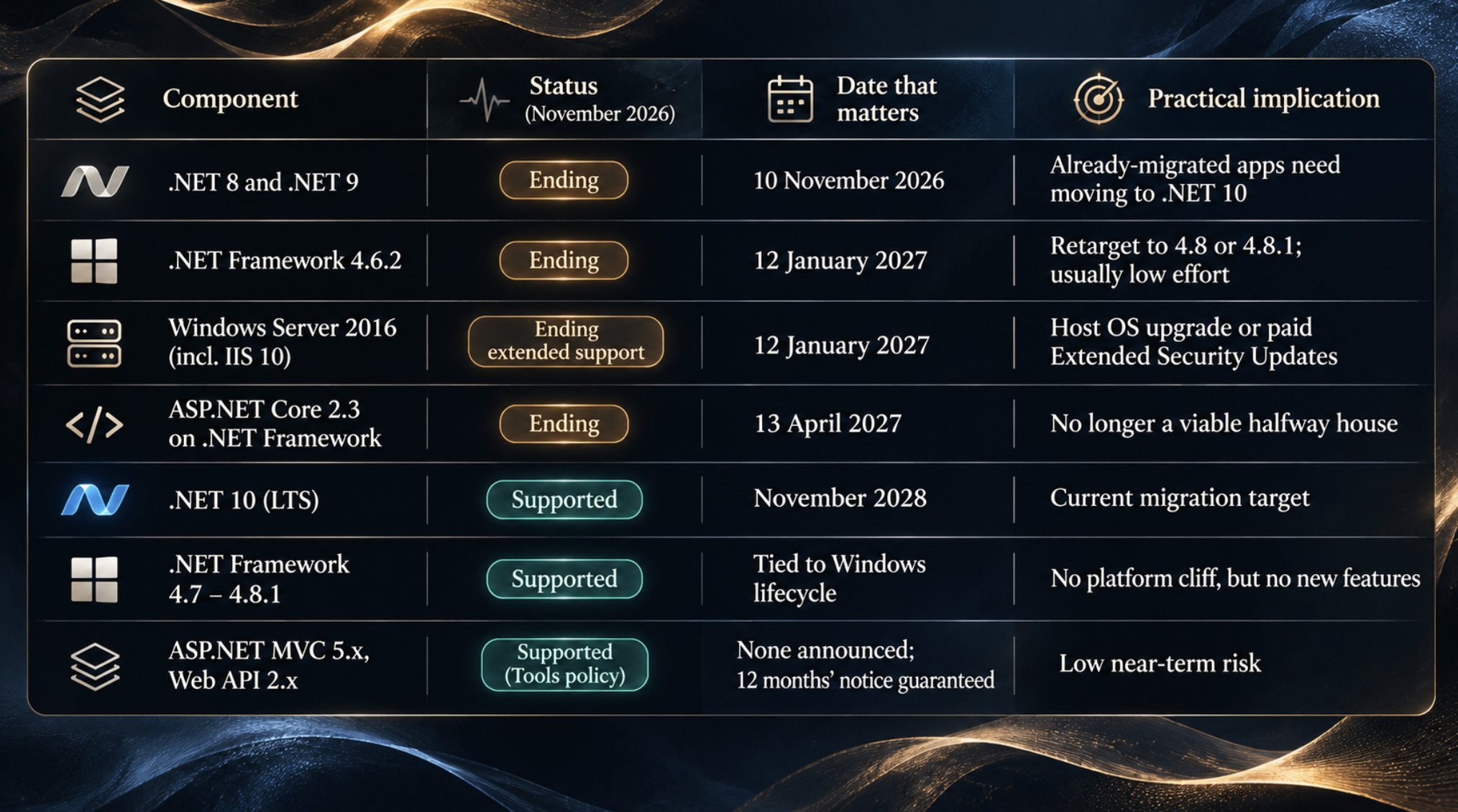
The pattern is instructive. The runtime under most legacy ASP.NET applications is not the problem in 2027. The problems cluster around it: the operating system it is hosted on, the transitional technologies people relied on, and the third-party dependencies that are not covered by Microsoft's policy at all.
Why migration difficulty varies so widely
Microsoft's own migration documentation is blunt that moving a production app from ASP.NET Framework to ASP.NET Core is non-trivial for most applications. The difficulty, however, is not evenly distributed. Several architectural characteristics predict pain far better than codebase size does:
Pervasive
System.Webcoupling. Business logic that reaches forHttpContext.Current,SessionorRequestfrom deep inside class libraries has to be untangled or adapted before it can run on ASP.NET Core.Web Forms pages and server controls. There is no automated path; each page is a rewrite of its UI layer, even if the logic behind it survives.
HTTP modules and handlers wired in
web.config. These map conceptually to middleware, but the ordering, lifecycle events and configuration model all differ.WCF services hosted in the same application. Server-side WCF is not part of modern .NET; the community CoreWCF project covers a subset of scenarios.
Windows-specific dependencies such as COM components, registry access, Windows authentication assumptions or GAC-installed assemblies.
Abandoned third-party packages — commercial UI suites, reporting engines and PDF libraries whose vendors never shipped modern .NET versions.
An MVC 5 application with a clean service layer and few of these traits can be a moderate project. A Web Forms application with business logic in code-behind files and three abandoned control suites is a different undertaking entirely, even if both have the same line count.
Part II — The costs that traditional budgets overlook
Most IT budgets see a legacy application as a hosting line and a maintenance headcount. Both are usually modest, which is why such systems look cheap. The real costs sit elsewhere, are rarely itemised, and vary enormously between applications. None of the following is universal. Each is a hypothesis to test, and each can be tested.
Security exposure lives in the dependency graph
The framework is rarely the weakest point. The libraries around it usually are: an old JSON serialiser, a logging package several major versions behind, a JavaScript bundle with jQuery and a UI plugin last updated a decade ago, or a commercial component that will never receive another patch. The OWASP Top 10:2025 reflects this shift by replacing the 2021 category "Vulnerable and Outdated Components" with a broader Software Supply Chain Failures category (A03), covering dependencies, build systems and distribution pipelines as well as known-vulnerable libraries.
For .NET Framework applications there is an extra trap: when a package's maintainers drop Framework support, the fix for a future vulnerability may only ship in a version you cannot install.
How to measure it: produce a software bill of materials for both NuGet and front-end packages. For each dependency, record its latest version, the latest version that supports your target framework, and the date of its last release. Packages where those two versions differ — or where the last release is several years old — are your real security perimeter. Run dotnet list package --vulnerable against SDK-style projects, or equivalent tooling for packages.config, and treat the results as a floor rather than a ceiling.
Knowledge concentrates, then evaporates
Mature applications accumulate tacit knowledge: why a particular retry exists, which batch job must run before which report, which customer has a special-case pricing rule. That knowledge tends to concentrate in two or three long-tenured engineers. The cost is invisible until one of them leaves.
How to measure it: use version-control history to calculate how many distinct authors have changed each area of the codebase in the last two years. Areas touched by a single person are concentration risks. Pair that with a simple exercise: ask someone who did not build the system to deploy it to a fresh environment using only written documentation, and record every point where they get stuck.
Onboarding takes longer than anyone budgets for
New developers increasingly arrive with ASP.NET Core experience and no exposure to Global.asax, ViewState or the Web Forms page lifecycle. That is a training cost, not a hiring impossibility, but it is real.
How to measure it: track time to first merged production change for each new engineer on the legacy system, and compare it with the same metric on any modern services the team owns.
Deployment friction is a tax on every change
Manual deployments, configuration transforms maintained by hand, build servers that cannot be rebuilt, and environment drift between staging and production all raise the cost of each release. Teams compensate by releasing less often, which batches more change into each release, which makes each release riskier.
How to measure it: the four DORA delivery metrics — deployment frequency, lead time for changes, change failure rate and time to restore service — are a reasonable, widely understood baseline. Even rough figures are revealing when compared across systems.
Testing limits what you dare to change
Many classic ASP.NET applications have little automated test coverage, and their architecture can make it hard to add. Logic embedded in Web Forms code-behind or in controllers that call HttpContext.Current directly resists unit testing. The result is a system that is safe to leave alone and expensive to touch.
How to measure it: code coverage figures are less useful than an inventory of critical business flows and whether each one has any automated end-to-end or integration test at all.
Infrastructure choices get made for you
Classic ASP.NET requires Windows and IIS. That constrains container strategy, hosting options and licensing. It also ties application risk to operating-system lifecycles: an application that is perfectly supported on .NET Framework 4.8 still becomes a compliance problem if it runs on Windows Server 2016 after 12 January 2027.
How to measure it: list every host the application runs on, with its OS version and end-of-support date. Then list the database engine and version: an application database still on SQL Server 2016 has its own end-of-support exposure.
Integration and opportunity costs compound
Modern identity providers, observability platforms and cloud SDKs increasingly target modern .NET first. Integrating them into a Framework application is often possible but awkward — and every awkward integration is a reason a product feature is delayed or quietly dropped. Opportunity cost is the hardest of these costs to quantify, and also frequently the largest.
How to measure it: ask product owners for the last year's list of features that were declined, deferred or scaled down because of the platform, and estimate their value in the organisation's normal terms.
Incident response becomes archaeology
When something does fail, sparse logging, no distributed tracing and undocumented integrations turn diagnosis into investigation. Mean time to recovery depends on who happens to be available.

How to measure it: review the last several incidents and record how much of the recovery time was spent understanding the system rather than fixing it.
Part III — Why a complete rewrite often fails
Once the hidden costs are visible, the instinctive response is to start again: same behaviour, modern stack, clean architecture. The argument against that instinct is old and well documented. In 2000, Joel Spolsky called rewriting from scratch the single worst strategic mistake a software company can make, pointing out that old code looks messy largely because it has absorbed years of bug fixes discovered in real-world use. More than two decades later, Martin Fowler's account of the Strangler Fig approach makes a similar observation from the architecture side: simple-sounding replacement plans have, in his experience, failed far more often than they succeeded, because existing behaviour is hard to specify and users will not wait years for new features.
These are the judgements of experienced practitioners, not controlled studies, and they should be read that way. But the mechanisms they describe are specific and recognisable.
The code is the specification
In a mature ASP.NET application, the most accurate description of the business rules is frequently the code itself. A pricing calculation might include a rounding behaviour that matches a contract signed in 2016. A validation rule might exist because a downstream system rejected a particular character set. A stored procedure might encode a regulatory reporting requirement nobody wrote down. Rewriting from requirements documents loses these rules; rewriting from the code means reading all of it carefully, which removes much of the supposed saving.
Behavioural compatibility is wider than the feature list
Users and integrators depend on behaviour, not features: date formats in a CSV export, the order of rows in a report, the exact HTTP status code a partner's integration checks, a URL bookmarked by a customer service team. A rewrite that implements every feature can still break dozens of these implicit contracts.
Integrations hide in configuration
Scheduled tasks on the web server, file drops into a network share, database triggers, linked servers, a partner calling an .asmx endpoint nobody remembers publishing. Many of these never appear in architecture diagrams. They are found either by careful discovery before the rewrite or by production incidents after it.
Data migration is a project in its own right
A new system rarely inherits the old schema unchanged. Years of production data contain nulls where the code assumes values, duplicate records the old application tolerated, and encodings from previous migrations. Moving that data, reconciling it, and maintaining it in two places during cutover is often underestimated.
Parallel running doubles the load
During a rewrite, the old system cannot stop changing. Regulatory updates, security patches and urgent business requests still land on it, and each must then be reimplemented in the new system — or the gap widens. Teams end up maintaining two products while delivering value on neither.
Scope grows because it can
A rewrite invites every stakeholder to add what they always wanted. Fowler adds a sharper point: much of the existing behaviour is not actually wanted, but on a big-bang project nobody has the time to establish which parts. Either way, the target moves.

What is demonstrated and what is merely plausible
It would be wrong to claim that full rewrites always fail. Some succeed, particularly for smaller applications with well-understood domains, good test suites and a business tolerant of a long freeze. Microsoft's own migration guide suggests in-place migration can work for sufficiently small applications, while recommending incremental migration for large production systems. What can be said with confidence is narrower: the risks above are structural, not accidental, and a plan that does not address each of them explicitly is a plan built on optimism.
Part IV — Three architectural paths
The choice is rarely binary. In practice there are three broad strategies, and a single estate may use all three for different applications.
Retain and stabilise
Keep the application on .NET Framework, but stop treating it as a black box. Retarget to 4.8 or 4.8.1, move the host to a supported Windows Server version, update every dependency that can be updated, replace those that cannot, add structured logging and health checks, write characterisation tests around critical flows, and automate the deployment. This is not doing nothing. Done properly, it is a substantial engineering programme — and for an application with a stable domain, little planned change and a supported runtime, it may be the most rational choice available.
Its limits are equally clear. It does not change the platform ceiling: the application stays Windows-only, remains outside modern .NET's performance and tooling improvements, and depends on whatever third-party packages still support Framework.
Incremental modernisation
Place a modern ASP.NET Core application in front of the existing one, move functionality across route by route or capability by capability, and retire the old application only when nothing is left in it. This is Fowler's Strangler Fig pattern, and it is the approach Microsoft now documents as the preferred route for large production ASP.NET applications, supported by its System.Web adapters and the YARP reverse proxy.
The price is transitional architecture: two applications, shared authentication and session, a proxy layer, and duplicated operational concerns for the duration. That complexity is deliberate. It buys the ability to ship value continuously and stop at any point with a working system.
Full replacement
Build a new system and cut over. This is justified more often than enthusiasts of incremental migration admit — when the business model has changed so much that the old domain model is wrong, when the application is small enough to rewrite in a short time, or when it is a Web Forms application whose UI must be rebuilt regardless. It is least justified when the main motivation is that the code is old.
How the paths compare
Dimension
Retain and stabilise
Incremental modernisation
Full replacement
Technical complexity
Low to moderate; familiar stack, limited new architecture
High during transition; two runtimes, proxy, shared auth and session
High; new architecture, data migration, cutover planning
Business disruption
Minimal
Low per step if routing and rollback are disciplined
Concentrated at cutover; often significant
Testing requirements
Characterisation tests for critical flows
Regression baseline plus side-by-side comparison per migrated slice
Full behavioural equivalence testing before cutover
Cost predictability
High; mostly known work
Moderate; each slice is estimable, total duration less so
Low; discovery continues throughout
Time to value
Fast for security and operability; none for new capability
Early and continuous; first slice can ship within the first phase
Late; most value arrives at or after cutover
Long-term flexibility
Limited by the Framework ceiling and dependency availability
High once complete; partial benefits during transition
High if delivered; depends on design quality
Principal risks
Dependency dead ends; host OS deadlines; slow knowledge loss
Transition never finishes; permanent dual-stack overhead
Lost business rules; overrun; parallel maintenance
The most consequential row is the last one. Each path has a characteristic way of failing, and the failure modes are very different. Retain-and-stabilise fails slowly. A full rewrite fails expensively and visibly. Incremental modernisation fails by stalling, leaving an organisation running two stacks indefinitely — a risk that has to be managed with explicit retirement milestones, not wished away.
Part V — A practical decision framework
The framework below is not a scoring model. Weighted scorecards tend to produce false precision and invite people to adjust weights until the preferred answer appears. Instead, it is a structured investigation in four stages. Each stage produces evidence, and some findings are decisive on their own.
Stage 1: Establish the non-negotiables
These questions identify constraints that override preference.
Is any component already out of support, or about to be? Check the exact .NET Framework version, the host OS, the database engine and any ASP.NET Core 2.3 packages against the dates in Part I. An application on .NET Framework 4.6.1 on Windows Server 2016 has a hard problem in January 2027 regardless of strategy, but that problem is usually solved by retargeting and rehosting, not by rewriting.
Are there dependencies with known vulnerabilities and no Framework-compatible fix? This is the finding most likely to force action. A single unpatched component that handles untrusted input can justify replacing that component, and sometimes the subsystem around it.
Are there regulatory or contractual requirements the current platform cannot meet? Customer security assessments, data-residency rules or audit requirements sometimes demand capabilities — specific encryption, logging or identity features — that are impractical on the existing stack.
If Stage 1 surfaces nothing urgent, there is time to decide carefully. If it surfaces something, the immediate remedy is usually narrower than a migration.
Stage 2: Assess the system's condition
How compatible are the dependencies? Classify every package as available on modern .NET, replaceable with known effort or no path. A long no path list is the strongest technical argument against a quick migration.
How often is the application deployed, and how painful is it? A system deployed twice a year with manual steps carries more delivery risk than one deployed weekly through a pipeline, whatever the framework.
What does automated testing actually cover? No meaningful regression coverage means the first investment, for any strategy, is characterisation tests. Without them, neither incremental migration nor rewrite can prove it preserved behaviour.
What do recent incidents reveal? Recurring incidents rooted in the platform — memory pressure, thread-pool starvation, session-state failures — point towards change. Incidents rooted in data or integrations point towards better operability, which is platform-neutral.
Stage 3: Assess the business context
How critical is the application, and how much downtime can the business absorb? High criticality and low tolerance for disruption both argue against big-bang cutover.
How much change is coming? This is the question that most often decides the outcome. An application expected to change little over the next three to five years rarely justifies migration on platform grounds alone. One at the centre of the product roadmap usually does, because the friction from Part II multiplies with every feature.
Who can work on it? If two people understand the system and neither will be there in three years, knowledge transfer becomes a requirement under every strategy — and incremental migration is one of the more effective ways to force it.
What are the budget and delivery constraints? Incremental modernisation needs sustained, moderate funding over a long period. A rewrite needs large funding with a long delay before return. Retention needs the least, but needs it indefinitely.
Stage 4: Map evidence to strategy
The findings rarely point unanimously in one direction, but common patterns are recognisable:
Low future change, supported runtime, manageable dependencies: retain and stabilise. Invest in tests, observability, deployment automation and the host OS. Revisit annually.
High future change, MVC or Web API architecture, reasonable separation of concerns: incremental modernisation, beginning with the capabilities the roadmap touches first.
High future change, Web Forms with logic in code-behind: incremental modernisation of the backend and data access first, then UI replacement page by page, accepting that the UI is effectively a rewrite.
Domain fundamentally changed, or application small with good test coverage: full replacement becomes defensible, provided data migration and cutover are planned as first-class work.
Urgent unpatched exposure with no time for migration: isolate the vulnerable component, put compensating controls around it, and plan its replacement as the first slice of whatever longer-term strategy follows.
One principle cuts across all of these. The decision should be made per application, and in large applications sometimes per subsystem. A portfolio-wide mandate to "get off .NET Framework by 2028" is a budget statement, not an architecture decision.
Part VI — A realistic incremental migration, step by step
This is an illustrative architecture, not a case study. Durations, team sizes and outcomes are deliberately omitted because they depend entirely on the system in question.
Consider a mature ASP.NET MVC 5 application on .NET Framework 4.8, hosted on IIS. It has four functional areas: authentication using ASP.NET Identity with cookie authentication; customer management (CRUD screens, search, account history); reporting (read-heavy pages and CSV/PDF exports); and an order workflow that is the core of the business. Everything shares one SQL Server database through Entity Framework 6 and a set of class libraries, several of which reference System.Web.
The team has chosen incremental modernisation. Here is how it might proceed.
1. Establish a regression-testing baseline
Before changing anything, capture what the system does today. Write characterisation tests — automated tests that record current behaviour, correct or not — around the flows that matter most: login, customer search, the most-used reports, order submission. For reports, store golden output files and compare byte-for-byte or field-by-field. Add HTTP-level tests that hit real routes and assert on status codes, headers and response bodies. These tests run against the legacy app now and against the proxied system later; they are the contract the migration must honour.
2. Inventory dependencies
List every project, NuGet package, front-end library, configuration-file section and external system. For each package, record whether a modern .NET version exists. Map the solution's internal project references as a graph. Microsoft's guidance is that supporting libraries should be upgraded in postorder depth-first order: leaf libraries first, the web application last. Note any library that touches System.Web types — those are candidates for the System.Web adapters.
This is also the moment to clean up: migrate from packages.config to PackageReference, convert class libraries to SDK-style projects, remove dead code and fix compiler warnings. Microsoft recommends doing this debt remediation before upgrading supporting libraries, and it improves the legacy app even if the migration stops.
3. Identify application boundaries
Look for seams: places where a capability can be separated by URL, by data ownership and by code dependency. Here, reporting stands out. It has its own URL prefix (/reports/*), it mostly reads data, it is used by internal staff rather than customers, and it shares a small number of query classes with the rest of the application. The order workflow is the opposite: write-heavy, customer-facing and entangled with everything. It goes last.
4. Extract a low-risk capability
Move the reporting query library to target .NET Standard 2.0, or multi-target it for .NET Framework and .NET 10, so both applications can use the same code. Where it reads HttpContext.Current — for the current user's region, say — reference the Microsoft.AspNetCore.SystemWebAdapters package instead of System.Web, so the same calls resolve on both runtimes. The goal at this stage is shared logic, not new logic.
5. Introduce a modern .NET component
Create a new ASP.NET Core application on .NET 10 that will become the public entry point. It hosts the migrated reporting controllers and forwards everything else to the legacy application through YARP. The legacy application gains a small amount of configuration so the two can share authentication and, if needed, session state.
The core of the new application's startup looks like this. It follows the remote-app pattern in Microsoft's current incremental migration documentation:
// Program.cs — new ASP.NET Core (.NET 10) entry-point application
using Microsoft.AspNetCore.SystemWebAdapters;
using Microsoft.Extensions.Options;

var builder = WebApplication.CreateBuilder(args);

builder.Services.AddControllers();

// Lets the new app call back to the MVC 5 app (shared API key, legacy URL).
// Remote authentication and remote session are layered on here
// when migrated endpoints need them.
builder.Services.AddSystemWebAdapters()
    .AddRemoteAppClient(options =>
    {
        options.RemoteAppUrl = new(builder.Configuration["RemoteAppUri"]!);
        options.ApiKey = builder.Configuration["RemoteAppApiKey"]!;
    });

builder.Services.AddReverseProxy();

var app = builder.Build();

app.UseRouting();
app.UseAuthentication();
app.UseAuthorization();
app.UseSystemWebAdapters();

// Migrated capability: /reports/* now handled here.
app.MapControllers();

// Anything without a local route is forwarded to the legacy app.
var legacyUrl = app.Services
    .GetRequiredService<IOptions<RemoteAppClientOptions>>()
    .Value.RemoteAppUrl.OriginalString;

app.MapForwarder("/{**catch-all}", legacyUrl)
   .WithOrder(int.MaxValue)   // lowest priority: runs only if nothing else matches
   .ShortCircuit();           // skip remaining middleware for forwarded requests

app.Run();
On the legacy side, the application registers the adapters' remote-app server in Application_Start with the same API key, and the SystemWebAdapterModule HTTP module is added to web.config. Microsoft's documentation adds three operational details worth noting: the key must be a GUID-formatted string, the legacy application should be served over TLS and ideally reachable only through the proxy, and both applications must use identical virtual directory layouts.
[embed: node/6a3bbb3d-1371]
Requests with a local route are served by ASP.NET Core; everything else is forwarded to the MVC 5 app, while a keyed remote-app channel lets the new app reuse the old app's login and session during the transition.
6. Route selected traffic safely
Because local routes take precedence over the catch-all forwarder, "migrating" a route means adding its endpoint to the new application. That has a useful property: removing or disabling the endpoint reverts traffic to the legacy implementation without a redeploy of the legacy app. Teams that want a gradual rollout typically put the new endpoint behind a feature flag that falls back to forwarding, or start with an internal-only route such as /reports-v2 before swapping the canonical path.
Authentication deserves particular care. With the remote authentication feature, the new application can defer authentication decisions to the legacy application, so users keep a single login across both. That is an excellent transitional measure and a poor permanent one: every authenticated request to the new app depends on a call back to the old one.
7. Monitor behaviour and compatibility
Run the regression baseline from step 1 against the new entry point continuously. Compare report outputs between old and new implementations for the same inputs. Instrument both applications with OpenTelemetry; Microsoft's documentation shows instrumentation for ASP.NET Framework and ASP.NET Core side by side, so a single trace can follow a request through the proxy into the legacy app. Watch latency added by the proxy hop, error rates per route, and authentication failures in particular.
8. Retire old functionality progressively
Once a migrated capability has run cleanly for an agreed period, delete its controllers, views and dead code from the legacy application. This step is easy to skip and important not to, because the legacy app only shrinks if code is actually removed. Then repeat: customer management next, the order workflow last, authentication moved natively to ASP.NET Core once the legacy app no longer needs to own it.
When the forwarder no longer receives traffic, the legacy application can be switched off. One task remains: the new application is still using the System.Web adapters, and the final stage of the migration is replacing those calls with native ASP.NET Core APIs.
A note on tooling: the .NET Upgrade Assistant, long the default starting point, is now officially deprecated. Microsoft points teams to the GitHub Copilot app modernization agent in Visual Studio 2026 and Visual Studio 2022 17.14.16 or later. Whatever tooling is used, its output deserves the same scrutiny as any other change — which is exactly what the regression baseline is for.
Conclusion — Modernisation is a business decision expressed through architecture
The evidence in late 2026 points in two directions at once, and both are true.
The platform beneath most legacy ASP.NET applications is more durable than its reputation suggests. .NET Framework 4.8.1 remains supported alongside Windows. MVC 5 and Web API 2 have no announced end date and a guaranteed year of notice. For a stable application with modest change ahead, retaining it — properly stabilised, on a supported host, with current dependencies and real tests — is a legitimate architectural choice, not a failure of ambition.
At the same time, the ground around that platform is moving. Windows Server 2016 and .NET Framework 4.6.2 leave support in January 2027. ASP.NET Core 2.3, the bridge many teams assumed would always be there, closes in April 2027. Supply-chain risk now sits explicitly near the top of OWASP's list. The cost of carrying an application that cannot change easily is paid mostly in delays, deferred features and concentrated knowledge — costs that never appear on the hosting invoice.
The practical conclusion is not "rewrite the oldest thing first". It is to measure before deciding: inventory dependencies, test what the system actually does, count how often and how painfully it changes, and set that against how much it needs to change. For many organisations, that investigation will show one application that should be left alone, one that should be strangled gradually, and occasionally one that genuinely needs replacing.
The skill is telling them apart — and accepting that the right answer for each may change as the business around it does.
References
Microsoft Learn — Microsoft .NET Framework lifecycle: version-by-version support dates, including 4.6.2 ending 12 January 2027.
Microsoft .NET — ASP.NET Support Policy (updated April 2026): MVC 5.x and Web API 2.x support status; ASP.NET Core 2.3 end of support on 13 April 2027.
.NET Blog — .NET 8 and .NET 9 will reach End of Support on November 10, 2026: modern .NET support dates and .NET 10 LTS through November 2028.
Microsoft Learn — Migrate from ASP.NET Framework to ASP.NET Core and Remote app setup: incremental migration, System.Web adapters, YARP fallback configuration.
Microsoft Windows Server Blog — Planning ahead for Windows Server 2016 end of support: extended support ends 12 January 2027.
OWASP — A03:2025 Software Supply Chain Failures (Japanese edition opened; editor to swap for the English URL — see checklist).
Martin Fowler — Strangler Fig (revised 22 August 2024).
Joel Spolsky — Things You Should Never Do, Part I (6 April 2000).
Supplementary: Microsoft Learn — Migrate from ASP.NET Web Forms to Blazor and .NET Upgrade Assistant overview (deprecation notice).
Editor-only fact-checking checklist
Re-check every date in the Part I table against Microsoft lifecycle pages on the actual publication day; the .NET 8/9 cutoff (10 November 2026) falls days after drafting, so adjust tense if published later.
Confirm whether .NET 11 has reached general availability by publication; the article deliberately does not mention it as released.
Confirm SQL Server 2016's end-of-extended-support date on Microsoft's lifecycle page (drafted from a secondary source as July 2026); the article references it without a date.
Confirm Windows Server 2016 Extended Security Updates terms before adding any detail beyond "paid ESU".
Confirm MVC 5.x / Web API 2.x still show no announced end-of-support date on the ASP.NET Support Policy page.
Swap the OWASP reference for the English-language A03:2025 URL and confirm it resolves; change the Upgrade Assistant link to the en-us locale.
Ask a .NET engineer to compile the Program.cs sample against current
Microsoft.AspNetCore.SystemWebAdaptersand YARP packages on .NET 10; check middleware ordering against the Remote app setup page.Verify the CoreWCF statement ("covers a subset of scenarios") against the project's current documentation.
Confirm
dotnet list package --vulnerablebehaviour for SDK-style projects referencing .NET Framework.Check that the Spolsky and Fowler attributions remain paraphrased, with no direct quotation.
Confirm house style on British spelling in body copy versus US spelling in SEO fields.